Viewing the Medication Review Workbench
The Medication Review Workbench contains two tabs:
-
Activities
-
Pending
Select the applicable tab to learn about the Medication Review Workbench in your province.
Activities
The Activities tab displays medication reviews that are scheduled for the current day and those that are incomplete. It does not show medication reviews scheduled in the future. Medication reviews scheduled in the future can be viewed in the Propel Rx Activities tile by selecting the appropriate date.
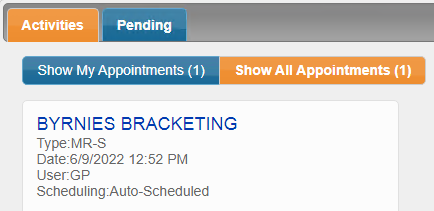
There are two sub-tabs in the Activities tab:
-
Show My Appointments - displays scheduled medication reviews for the logged in user for that day or appointments that have been rolled over from previous days.
-
Show All Appointments - displays all scheduled medication reviews for the day or appointments that have been rolled over from previous days. Select this tab if the patient is in the pharmacy but the review has been scheduled for another pharmacist.
Pending
The Pending tab displays medication reviews that have been started but not completed.
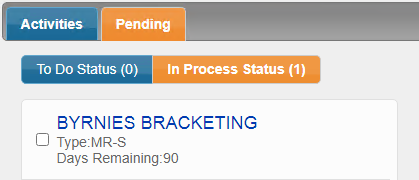
There are two sub-tabs in the Pending tab:
-
In Process Status - displays saved but incomplete medication reviews.
Activities
The Activities tab displays medication reviews that are scheduled for the current day and those that are incomplete. It does not show medication reviews scheduled in the future. Medication reviews scheduled in the future can be viewed in the Propel Rx Activities tile by selecting the appropriate date.
There are two sub-tabs in the Activities tab:
-
Show My Appointments - displays scheduled medication reviews for the logged in user for that day or appointments that have been rolled over from previous days.
-
Show All Appointments - displays all scheduled medication reviews for the day or appointments that have been rolled over from previous days. Select this tab if the patient is in the pharmacy but the review has been scheduled for another pharmacist.
Pending
The Pending tab displays medication reviews that have been started but not completed.
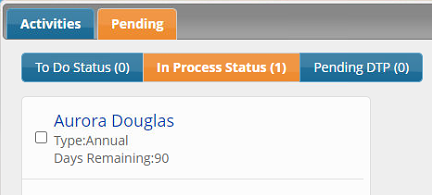
There are three sub-tabs in the Pending tab:
-
In Process Status - displays saved but incomplete medication reviews.
-
Pending DTP - reviews that are pended and are awaiting a resolution to a drug therapy problem.